
SOPAN
ArticlesEvents
SOPAN
About UsBusiness TermsConsultant TermsMobile App Privacy Policy
SONARTutorial SONARAkte AI
ArticlesEvents
TUTORIAL CENTER

SONAR Tutorials: Build and Manage Your Online Store

Pick the feature you want to learn. Every tutorial can be watched as a video or read step by step, so you can follow along even when you can’t play a video.

18 tutorials per feature6 videosWatch or read, your choice

New to SONAR? Start here

Follow these 5 tutorials in order until your store is ready to take orders.

1Create an account & website2:32
2Set up your Landing Page3:50
3Add Products1:52
4Set up Shipping2:04
5Activate Payments1:10
Start from step 1

Getting Started

Create an account and set up your business profile.

5 tutorial
Video 0:35

Creating an Account

Sign up at sopan.id with email or a Google account, then verify your email.

4 written stepsOpen tutorial →
Video 1:46

Building Your First Website

Sign up at sopan.id, fill in your business details, pick a plan, and your first website is ready.

9 written stepsOpen tutorial →
Video 0:25

Business Profile

Fill in your logo, business name, business model, WhatsApp number, and import data from Tokopedia.

4 written stepsOpen tutorial →
Video 0:13

Discovery Chat

Introduce your business to SONAR’s AI through a short Q&A session.

3 written stepsOpen tutorial →
Video 0:08

Ground Truth

Review the business summary the AI uses to build your website and content.

2 written stepsOpen tutorial →

Online Store

Design your storefront, add products, and manage stock.
3 tutorial
Video 3:50

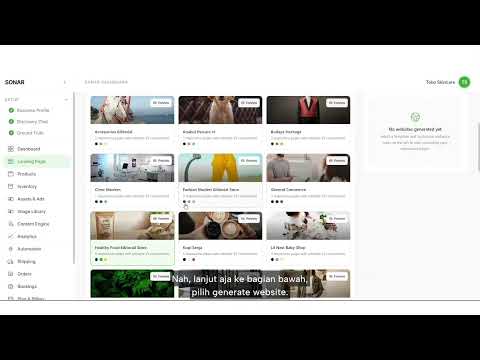
Landing Page

Pick a template, generate your website, edit sections, set up a pop-up, then publish with your domain.

10 written stepsOpen tutorial →
Video 1:52

Products

Add products, strikethrough pricing, variants, purchase limits, and categories.

8 written stepsOpen tutorial →
Video 0:31

Inventory

Turn on Track Stock, log incoming stock, and let stock deduct automatically on each purchase.

4 written stepsOpen tutorial →

Promotion & Content

Manage images, content, ads, and track store performance.

4 tutorial
SONAR Pro
Video 0:18

Assets & Ads

Track the status of live ads. Ad setup is handled by the Sopan team.

2 written stepsOpen tutorial →
Video 0:41

Image Library

Generate promo or banner images with AI, then download or request a revision.

5 written stepsOpen tutorial →
Video 0:19

Content Engine

See the article plan and content SONAR’s AI generates and publishes automatically.

2 written stepsOpen tutorial →
Video 0:19

Analytics

Track store and ad performance in real time through charts.

2 written stepsOpen tutorial →

Orders & Shipping

Set up shipping and process incoming orders.

3 tutorial
Video 2:04

Shipping

Set up shipping type, pickup address, courier, free shipping, zones, and the checkout form.

9 written stepsOpen tutorial →
Video 0:27

Orders

View incoming orders and follow the guided order process through to printing labels and pickup.

3 written stepsOpen tutorial →
Video 0:17

Bookings

For appointment-based businesses. Setup is handled directly by Sopan support.

2 written stepsOpen tutorial →

Account & Payments

Manage your subscription, payments, and account settings.

3 tutorial
Video 0:48

Plan & Billing

Renew your subscription, top up your ad balance, or purchase a setup service.

4 written stepsOpen tutorial →
Video 1:10

Payments

Activate your iPaymu payment account, cart and checkout, legal pages, then withdraw your balance.

7 written stepsOpen tutorial →
Video 0:26

Settings

Manage your account profile, team members, custom domain, and password.

4 written stepsOpen tutorial →

Frequently Asked Questions About Tutorials

No. Every tutorial has full written steps with images, so you can follow along without playing a video. Video is there if you want to see it in action.

Can’t find the tutorial you’re looking for?

The Sopan support team is ready to help via WhatsApp, including setting up Bookings, ads, and custom domains.

Chat support via WhatsAppOpen Dashboard

SOPAN

  • Business Terms
  • Consultant Terms

Solutions

  • Akte AI

Contact

  • admin@sopan.id
  • +62 811-8806-7380
  • Jl. Rajawali Selatan 2 No.1 5, RT.5/RW.6, Gn. Sahari Utara, Kecamatan Sawah Besar, Kota Jakarta Pusat, Daerah Khusus Ibukota Jakarta 10720

© 2026 PT Sobat Sepadan Indonesia

SOPAN
ArticlesEvents
SOPAN
About UsBusiness TermsConsultant TermsMobile App Privacy Policy
SONARTutorial SONARAkte AI
ArticlesEvents
TUTORIAL CENTER

SONAR Tutorials: Build and Manage Your Online Store

Pick the feature you want to learn. Every tutorial can be watched as a video or read step by step, so you can follow along even when you can’t play a video.

18 tutorials per feature6 videosWatch or read, your choice

New to SONAR? Start here

Follow these 5 tutorials in order until your store is ready to take orders.

1Create an account & website2:32
2Set up your Landing Page3:50
3Add Products1:52
4Set up Shipping2:04
5Activate Payments1:10
Start from step 1

Getting Started

Create an account and set up your business profile.

5 tutorial
Video 0:35

Creating an Account

Sign up at sopan.id with email or a Google account, then verify your email.

4 written stepsOpen tutorial →
Video 1:46

Building Your First Website

Sign up at sopan.id, fill in your business details, pick a plan, and your first website is ready.

9 written stepsOpen tutorial →
Video 0:25

Business Profile

Fill in your logo, business name, business model, WhatsApp number, and import data from Tokopedia.

4 written stepsOpen tutorial →
Video 0:13

Discovery Chat

Introduce your business to SONAR’s AI through a short Q&A session.

3 written stepsOpen tutorial →
Video 0:08

Ground Truth

Review the business summary the AI uses to build your website and content.

2 written stepsOpen tutorial →

Online Store

Design your storefront, add products, and manage stock.

3 tutorial
Video 3:50

Landing Page

Pick a template, generate your website, edit sections, set up a pop-up, then publish with your domain.

10 written stepsOpen tutorial →
Video 1:52

Products

Add products, strikethrough pricing, variants, purchase limits, and categories.

8 written stepsOpen tutorial →
Video 0:31

Inventory

Turn on Track Stock, log incoming stock, and let stock deduct automatically on each purchase.

4 written stepsOpen tutorial →

Promotion & Content

Manage images, content, ads, and track store performance.

4 tutorial
SONAR Pro
Video 0:18

Assets & Ads

Track the status of live ads. Ad setup is handled by the Sopan team.

2 written stepsOpen tutorial →
Video 0:41

Image Library

Generate promo or banner images with AI, then download or request a revision.

5 written stepsOpen tutorial →
Video 0:19

Content Engine

See the article plan and content SONAR’s AI generates and publishes automatically.

2 written stepsOpen tutorial →
Video 0:19

Analytics

Track store and ad performance in real time through charts.

2 written stepsOpen tutorial →

Orders & Shipping

Set up shipping and process incoming orders.

3 tutorial
Video 2:04

Shipping

Set up shipping type, pickup address, courier, free shipping, zones, and the checkout form.

9 written stepsOpen tutorial →
Video 0:27

Orders

View incoming orders and follow the guided order process through to printing labels and pickup.

3 written stepsOpen tutorial →
Video 0:17

Bookings

For appointment-based businesses. Setup is handled directly by Sopan support.

2 written stepsOpen tutorial →

Account & Payments

Manage your subscription, payments, and account settings.

3 tutorial
Video 0:48

Plan & Billing

Renew your subscription, top up your ad balance, or purchase a setup service.

4 written stepsOpen tutorial →
Video 1:10

Payments

Activate your iPaymu payment account, cart and checkout, legal pages, then withdraw your balance.

7 written stepsOpen tutorial →
Video 0:26

Settings

Manage your account profile, team members, custom domain, and password.

4 written stepsOpen tutorial →

Frequently Asked Questions About Tutorials

No. Every tutorial has full written steps with images, so you can follow along without playing a video. Video is there if you want to see it in action.

Can’t find the tutorial you’re looking for?

The Sopan support team is ready to help via WhatsApp, including setting up Bookings, ads, and custom domains.

Chat support via WhatsAppOpen Dashboard

SOPAN

  • Business Terms
  • Consultant Terms

Solutions

  • Akte AI

Contact

  • admin@sopan.id
  • +62 811-8806-7380
  • Jl. Rajawali Selatan 2 No.1 5, RT.5/RW.6, Gn. Sahari Utara, Kecamatan Sawah Besar, Kota Jakarta Pusat, Daerah Khusus Ibukota Jakarta 10720

© 2026 PT Sobat Sepadan Indonesia